Can Claude Generate Images? What It Can Make for Ads
Claude doesn't generate photos or illustrations itself. Here's what it can make (SVG, HTML visuals, Claude Design) and 4 ways to get ad images with Claude.
Morpho Team · · 10 min read
No, Claude can't generate images the way an image model does: Anthropic's own help center says Claude "doesn't generate photos or illustrations the way image-generation tools do." What it can do is build visuals out of code (charts, diagrams, SVG graphics and HTML layouts), design slides and social assets in Claude Design, and call a separate image generator through a connector. For ads, that last part matters most: Claude can plan, write and review the ad, while a connected tool renders the picture.
This guide explains what Claude can and can't make as of October 2026, the four practical ways to get images with Claude, and how to use them for ad creatives.
Can Claude generate images?
Claude can't generate raster images (photos, illustrations, paintings) on its own. The Claude Help Center article "Can Claude produce images?" (dated March 16, 2026) says so plainly, and adds two things it can do instead:
- Build visuals in the chat. Claude can create "diagrams, charts, and interactive visuals directly in your conversation", made with HTML and SVG, which you can then ask it to adjust. The help center lists this as a beta on Claude web and desktop.
- Read images. Claude can view and analyze images you upload, such as a screenshot of an ad, a product photo or a competitor's banner.
So when people ask "why can't Claude generate images?", the honest answer is that Anthropic hasn't shipped a built-in image model. Claude is a language and vision model: it understands pictures and writes code that draws shapes, text and layouts, but it doesn't paint pixels from a prompt.
What can Claude make instead of images?
Claude makes visuals that are built from code, which is a different thing from a generated photo. Here is what that covers:
| What you ask for | What Claude produces | Good for ads? |
|---|---|---|
| A chart, diagram or infographic | HTML/SVG visual in the chat | Yes, for data-led or explainer ads |
| A logo idea, icon or simple illustration | SVG code (vector shapes) | Partly: flat shapes, not photo-real |
| An ad layout with headline, CTA and colors | HTML/CSS layout you can screenshot or export | Yes, if you supply the product photo |
| Slides, one-pagers, social media assets | Claude Design (see below) | Yes, for layout-led designs |
| A photo of a product in a scene | Not possible natively; needs an image model | Only through a connector or another tool |
| A prompt for an image tool | Text you paste into an image generator | Yes, Claude is good at writing these |
The key point for marketers: a lot of a good static ad is layout, type and color, not the photo. Code-built visuals handle that part well, and they have a real advantage over generated pictures: the words are always spelled correctly, because they are typed text rather than painted letters.
What is Claude Design, and does it generate images?
Claude Design is Anthropic's tool for visual work, launched by Anthropic Labs on April 17, 2026. Anthropic describes it as making designs, prototypes, slides and one-pagers, and lists "marketing materials like landing pages and social media assets" among its uses. Designs can be exported to Canva, PDF, PPTX or standalone HTML. Since September 16, 2026 it also works inside ordinary Claude conversations, next to Claude Docs and Claude Slides, as a beta on paid plans.
Anthropic's announcement doesn't say that Claude Design generates photos, and it treats uploaded images as an input. In practice that means you bring the product shots, and Claude Design arranges them with type and color into a layout. If you need a new photo-style picture, you still need an image model.
How to get images with Claude: 4 ways
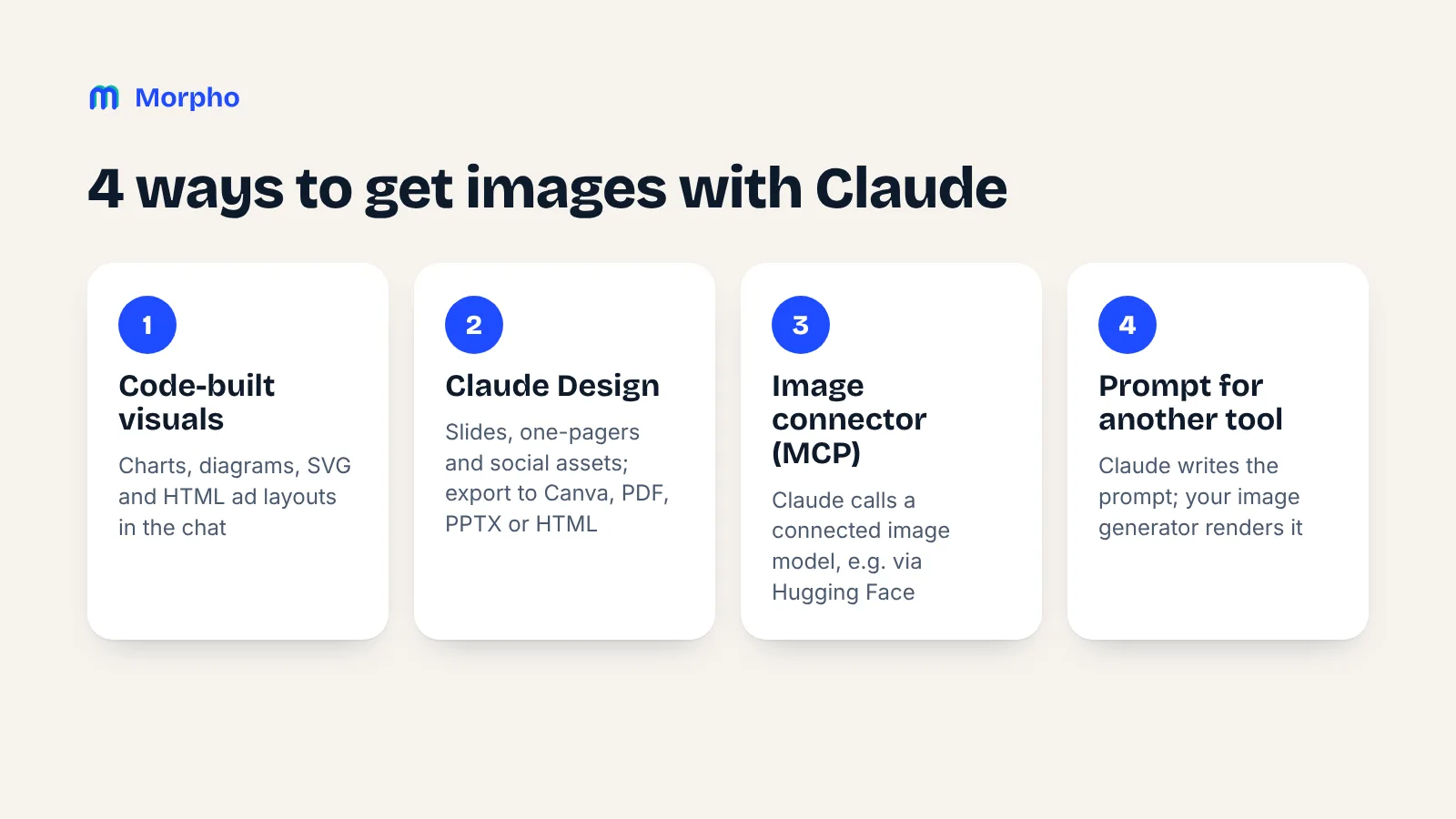
There are four practical routes, from the simplest to the most automated:
- Code-built visuals in the chat. Ask for a chart, an SVG illustration or an HTML ad layout. No setup, available in the chat; best for flat graphics, diagrams and text-led designs.
- Claude Design. Ask for a social post, a one-pager or a slide and export it. Paid plans, research preview; best for layouts that use your own photos.
- An image-generation connector (MCP). Connect Claude to a service that runs an image model, and Claude calls it for you. For example, Hugging Face's guide shows Claude creating images through its MCP server with models such as FLUX.1 Krea [dev] (photo-like images) and Qwen-Image (better at text in images). Claude writes the prompt; the connected model renders the picture.
- Claude writes the prompt, another tool renders it. Ask Claude for a detailed image prompt (subject, light, angle, background, aspect ratio, what to leave out) and paste it into the image generator you already use.
Connectors use the Model Context Protocol (MCP), an open standard that lets Claude use outside tools. According to Claude's help center on custom connectors, custom connectors are available on Free, Pro, Max, Team and Enterprise plans (Free is limited to one), and on Pro and Max you add one under Customize → Connectors → Add → Add custom connector with the server's URL. On Team and Enterprise, an owner adds it for the organization and members then connect individually.
Is Claude or ChatGPT better for image generation?
For generating a picture from a prompt, ChatGPT has the built-in option: OpenAI added native image generation to GPT-4o in March 2025, while Claude has no built-in image model. If one prompt → one picture is all you need, a tool with an image model built in is the more direct route.
The comparison changes when the job is an ad rather than a picture. An ad needs a message, copy, a layout that fits the placement, your brand's colors and logo, and a check before it goes out. Claude is strong at the planning, writing and reviewing, and it can hand the rendering to a connected tool. Many teams use both kinds of tool: one to generate the visual, one to think, write and check.
How to make ad images with Claude (step by step)
If you want to make an image ad with Claude today, this workflow keeps each part with the tool that does it best:
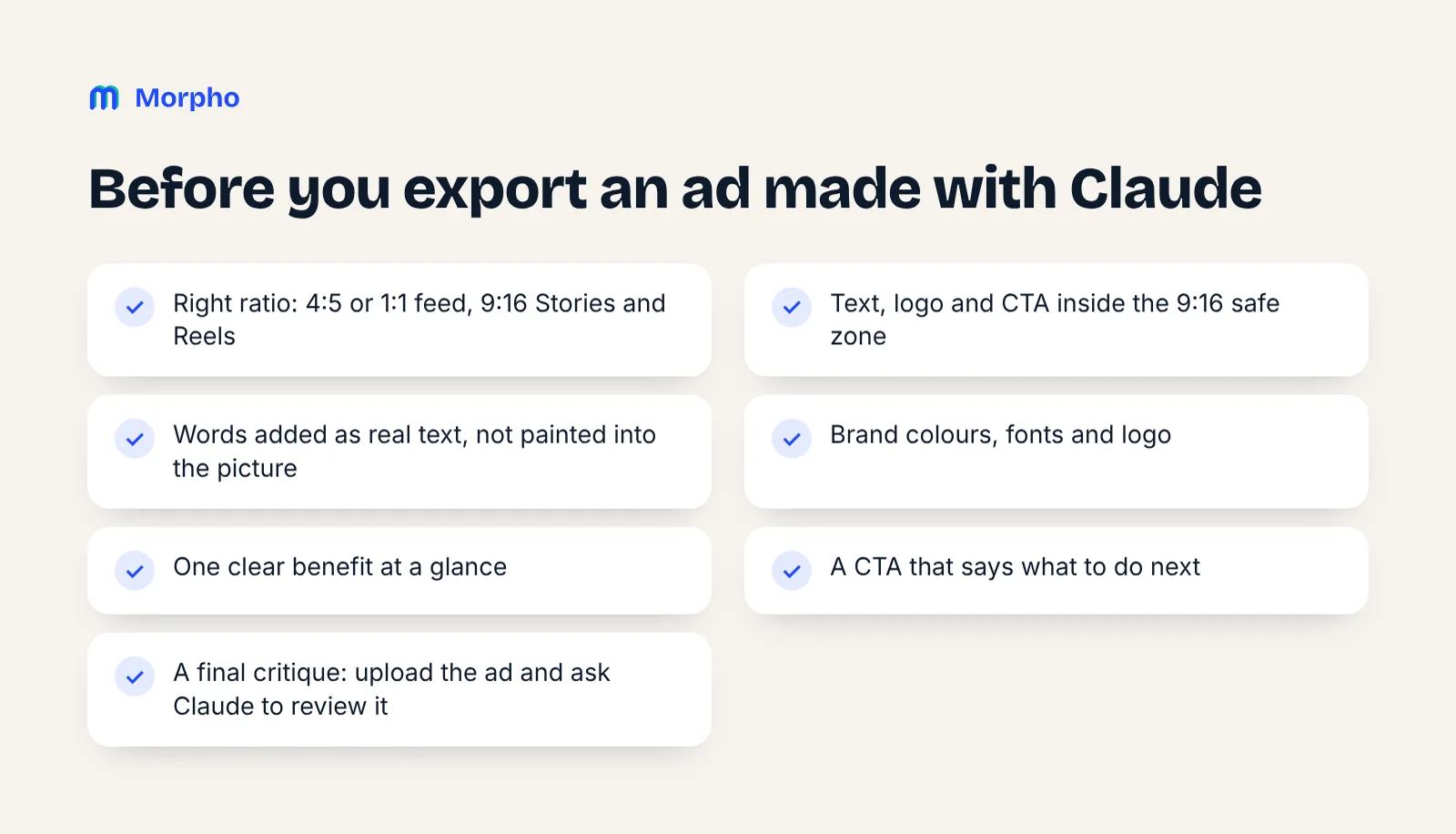
- Brief Claude. Give it the product, the audience, the offer and the placement (for example, an Instagram feed ad at 4:5). Ask for three angles, each with one main benefit.
- Get the copy. Ask for a headline, a short primary text and a CTA for the angle you pick. Our ad copy examples show what good looks like, and the ad copy character counter checks the limits.
- Get the visual. Use your own product photo, or generate a background through an image connector or with a prompt Claude wrote for you. Keep words out of generated pictures; add them as real text in the layout instead.
- Lay it out at the right size. Ask Claude (or Claude Design) for an HTML layout at the placement's aspect ratio: 4:5 or 1:1 for feeds, 9:16 for Stories and Reels. The ad image sizes tool lists the dimensions.
- Check the safe zones. On 9:16, keep text, logo and CTA away from the app's buttons and captions. The safe zone checker shows where they fall.
- Review before you export. Upload the finished ad back to Claude and ask it to critique the result: is the benefit clear at a glance, is the text readable on a phone, does it match the brand? Fix, then export as PNG.
It works well for one ad; it gets slow when you need a dozen versions in several sizes every week.
Is there an AI ad creative tool that connects to Claude?
Yes. Morpho Ads, an AI ad agency, connects to Claude as an MCP connector, which is the most direct answer if what you want from Claude is finished ad creatives rather than single images. Instead of you moving work between tools, the connector lets Claude hand the job to Morpho's team and get the result back.
Here is what it does, based on how the product is built:
- The team does the visual work. Inside Morpho, an Art Director agent designs each ad from scratch in HTML/CSS while seeing your real logo and product photos, a Copywriter writes the headline, sub-line and CTA, and a Critic looks at the rendered image, scores 7 criteria from 0 to 10 and asks for concrete fixes. The design and review loop continues until the critic approves (3 rounds included, capped at 8).
- Outputs. Static ads in 4:5, 1:1 and 9:16, and designed videos in 9:16, 4:5, 1:1 and 16:9 (6 to 60 seconds for ads), with 9:16 text kept clear of the Reels, Stories, TikTok and Shorts interfaces.
- From Claude. The connector (
https://morphoads.com/api/mcp, OAuth) has 13 tools: you can message Morpho, the agent that leads the team, list creatives with their critic scores and image or MP4 links, approve or revise briefs, ask for copy variations and read creative reports. Reading tools only read your own organization; producing work uses credits, as in the app.
Its limits, so you can compare fairly: Morpho doesn't publish or run your ads (sending paused drafts to Meta is "coming soon"), doesn't track ad performance yet, and every job, including one the critic didn't approve, uses credits for the work done. Its listing in Claude's connector directory is also "coming soon", so for now you add it as a custom connector. The Morpho for Claude page has the steps, how it works shows the team, and the pricing page has the plans; your first image ad or video is free. For the wider picture of AI tools that make ads, read our AI ads generator guide and what an AI advertising agency is.
FAQ
Why can't Claude generate images?
Anthropic hasn't built an image-generation model into Claude. Claude understands images and writes code that draws charts, SVG graphics and layouts, but it doesn't create photos or illustrations from a prompt. For that, it needs a connected image tool.
Can Claude make images for free?
Partly. Asking for SVG or HTML code works in any chat, and Free users can add one custom connector. Claude Design, Docs and Slides are on paid plans, and any image generator you connect has its own account and pricing.
Can Claude edit an image I upload?
Claude can analyze an uploaded image and describe what to change, and it can rebuild a layout around it in HTML or SVG. It doesn't retouch pixels in a photo; for that you need an image-editing tool, which some connectors provide.
Is Claude good for marketing?
Yes, for the thinking and writing parts: research, positioning, ad copy, briefs, critiques of finished ads and reports. For visuals, pair it with Claude Design, an image connector or an ad creative tool that connects to Claude.
Can Claude make video ads?
Not natively. Claude can write a scene-by-scene script and storyboard, and a connected tool can render the video. Morpho's Claude connector, for example, returns MP4 links for videos its team designed.
This article was prepared with the help of AI; facts and sources were checked before publishing.
Make your ads in one conversation.
Connect your site and write what you need. An AI team makes on-brand image ads, videos and social media posts; you get the version that passed quality control.
Try it free