AI ads generator: how to make ads with AI in 6 steps
How to use an AI ads generator to make static and video ads that look like your brand, with a step-by-step workflow, format guide and pre-launch checklist.
Morpho Team · · 8 min read
An AI ads generator is a tool that writes and designs ads for you: you give it your brand and what you want to promote, and it returns ready-to-post images or videos. To get ads that actually look like your brand, set up your brand kit first, pick one message per ad, choose the right mobile format, and review every output against a checklist before you publish. This guide walks through that workflow in six steps.
What is an AI ads generator?
An AI ads generator is software that uses AI to produce advertising creatives: the headline and copy, the visual design, and sometimes an animated video. The ads are made for placements such as the Instagram and Facebook feed, Stories, Reels and TikTok.
AI ad generators work in different ways. Some fill a fixed template with your text, some generate an image from a prompt, and some act as a small creative team that plans, designs and critiques the ad. Whichever kind you use, the basics of a good ad stay the same: a clear message, a design that matches your brand, and a review before launch.
How to make ads with AI (6 steps)
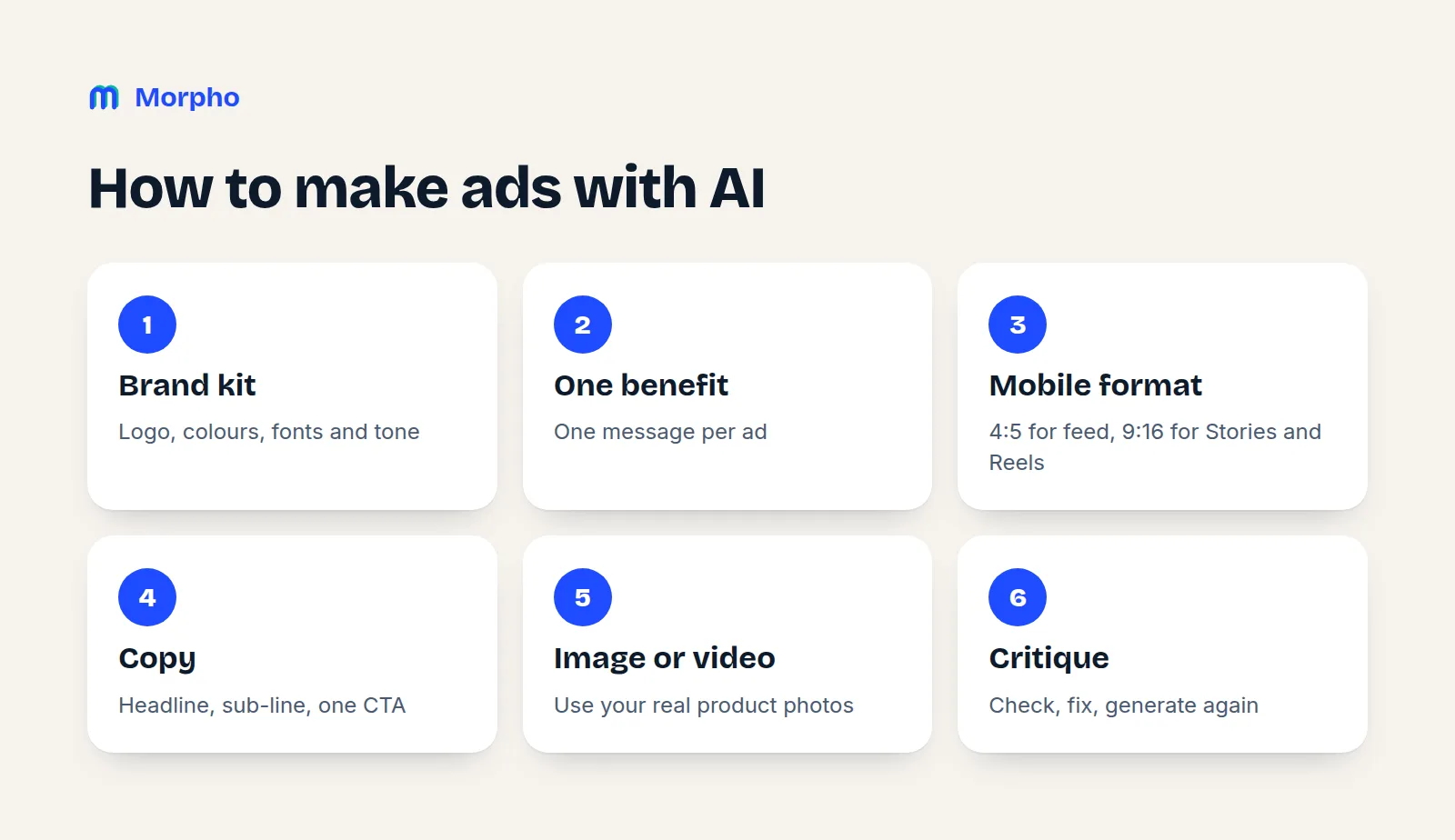
The most reliable way to make ads with AI is to split the work into six steps. The first three don't depend on the tool, and they decide most of the quality.
- Set up your brand kit. Logo, brand colours, fonts and tone of voice. Without these, AI-generated ads look generic.
- Pick one main benefit. An ad says one thing: a product benefit, an offer, or a problem and its solution. "Great coffee" is not a message; "notes of bergamot, lemon and jasmine" is.
- Choose a mobile format. Use 4:5 for the feed and 9:16 for Stories, Reels and TikTok (see the table below).
- Write the copy. A headline, a short sub-line and one call to action (CTA). If the headline can't be read at a glance on a phone, it's too long.
- Generate the image or video. Use your real product photos where you can. A product the AI "imagines" may not match what the customer receives.
- Critique and fix. Review the output with the checklist below, describe what's wrong in concrete terms, and generate again. Publishing the first output as is, is the most common mistake.
Which format should an AI-generated ad use?
The right format depends on where the ad runs. Most social ads are seen on a phone, so vertical and near-vertical formats usually work best.
| Placement | Format | Why |
|---|---|---|
| Instagram and Facebook feed | 4:5 | Takes up more of the screen than a square while scrolling. |
| Stories, Reels, TikTok | 9:16 | Fills the full phone screen. |
| Feeds that crop to a square | 1:1 | Safe everywhere, but smaller on screen. |
| YouTube and landscape video | 16:9 | Made for horizontal players. |
If you need the same ad in several formats, generate each format separately instead of cropping one image. The position of the text and the product changes with the frame, and cropping often cuts them off.
What to check before you publish an AI-generated ad
Always check an AI-generated ad on a phone, at real size. A design that looks good on a desktop screen can become unreadable as a small box in the feed.
Go through this checklist before every launch:
- Readability: Can you read the headline easily on a phone? Is there enough contrast between the text and the background?
- One message: Does the ad say one thing, or is it trying to say three?
- Brand fit: Is the logo correct and sharp? Do the colours and font match your brand?
- Product accuracy: Does the product look exactly like the real one, including the label, colour and packaging?
- Typos: If the AI put text inside the image, are the letters correct?
- Claims: Is there a claim you can't back up, such as "the best" or "50% faster"? Ad platform policies and consumer protection rules are strict about this.
- CTA: Does the viewer know what to do next ("Shop now", "Try it free")?
Instead of applying this list by hand every time, it's more reliable to build a critic step into the process: when a design is finished, someone reviews it, scores it and asks for concrete fixes.
How to make video ads with AI
A good AI video ad starts as a scene-by-scene script; animation only makes sense once the script is clear. For a short social video ad, this flow works well:
- First scene: Show the product or the problem right away. Viewers should understand what they're looking at before they scroll.
- Middle scenes: Make the main benefit concrete in one or two scenes (the moment of use, a close-up, before and after).
- Last scene: Your logo and one CTA.
- On-screen text: Put a short line in every scene so people watching with the sound off still get the message.
- Review: Watch the video frame by frame and check that the text is readable and the logo looks right.
Six to twenty seconds is usually enough for a social video ad. As with images, generate each format separately rather than cropping one video.
Is there a free AI ads generator?
Yes. Most AI ad generators offer limited free use, which is usually enough to try them out; regular ad production generally needs a paid plan or credits.
When you compare free AI ad makers, ask:
| Question | Why it matters |
|---|---|
| Can you use your own logo and font? | If not, the ad won't look like your brand. |
| Is there a watermark on the output? | A watermarked image can't run as an ad. |
| Which formats can you download? | Mobile ads need at least 4:5 and 9:16. |
| What does the free quota cover? | One image, one video, or only text? |
In Morpho, getting started is free: brand setup, the brand kit and one static ad or one video are included at no cost. Chat, the brand kit and editing are always free; after that, Morpho runs on credits from monthly plans. See the pricing page for plans and what credits cover.
How Morpho works as an AI ads generator
Morpho is an AI ad team that makes static ads and videos for your brand; you only talk to its Creative Director. It runs the six steps above as a team, in one conversation.
- Connect your website. Morpho reads your site and drafts your brand kit: logo, colours, fonts and tone. You check and correct it. Importing a product catalogue is optional.
- Tell the director what you need. For example: "Make 2 ads for Ethiopia Yirgacheffe: one 4:5, one 9:16." There is no brief form.
- The team takes over. Each agent does its own job:
| Agent | What it does |
|---|---|
| Creative Director | Talks with you, researches the brand and past work, hands out the work. |
| Strategist | Reads the product page and your website, picks the angle of the ad. |
| Copywriter | Writes the headline, sub-line and CTA, and the scene script for videos. |
| Art Director | Designs the ad from scratch with your real logo and product photos, and animates videos. |
| Critic | Looks at the finished design, scores it on 7 criteria and asks for concrete fixes. |
| Researcher | Looks at competitors' live ads and reports gaps to the team. |
- It's revised until the critic approves. The design and critique loop continues until the critic approves; the best round is delivered.
- Download your ads. Static ads come in 4:5, 1:1 and 9:16; videos in 9:16, 4:5, 1:1 and 16:9, from 6 to 20 seconds. Download statics as PNG and videos as MP4, and click any text to edit it.
You can watch every step live in the Studio. See the whole process in the How it works section.
One note: Morpho doesn't publish ads to Meta directly yet. You download the creatives and publish them from your own ad account. Direct publishing and performance tracking are coming soon.
FAQ
Do I need design skills to use an AI ads generator?
No, but you do need to know your brand. The AI can handle the design; your logo, colours, your product's main benefit and your audience have to come from you. The clearer they are, the more the ads look like your brand.
Can I use AI-generated ads on Instagram and TikTok?
Yes, as long as the format and content follow the platform's rules. Use 4:5 for the Instagram feed and 9:16 for Stories, Reels and TikTok. Before you publish, make sure every claim in the ad is true and the product looks like the real thing.
Is there a free AI ad generator?
Most tools have limited free use, and regular production usually needs a paid plan or credits. In Morpho, brand setup, the brand kit and one static ad or one video are free; after that it runs on monthly credit plans.
Can AI replace an ad agency?
For routine ad production (new product visuals, format variations, campaign variants) it can take on most of the work. Brand strategy, big campaign ideas and final approval still need a human decision; the best results come when someone who knows the brand reviews what the AI makes.
Make your ads in one conversation.
Connect your site and brief the Creative Director. A six-agent team revises on-brand static and video ads until the critic approves.
Get started